One UI
One UI 8: Samsung biggest step in mobile experience

The South Korean tech giant Samsung is known for its best Galaxy devices. The company has now getting ready to release another custom Android skin to with featuring best UI experience for its users. Yes, I am talking about One UI’s next version One UI 8, it will include intelligence, convenience, and personalization on the top level.
One UI 8 will be based on Android 16, it’s a full-package of digital evolution packed with powerful AI, sleek redesigns, improved multitasking, and security at its core.
Here’s everything you need to know about Samsung’s latest software innovation, its standout features, and why you should care if you’re a Galaxy user.
What’s New in One UI 8?
Smarter and More Intuitive AI
One UI 8 sets a new standard with integrated multimodal AI that makes your smartphone experience both seamless and proactive. Some flagship features include:
Now Bar: Context-sensitive tools and shortcuts, adapting in real time to what you’re doing. The Now Bar in Samsung’s One UI 8 is receiving significant updates and improvements. It will display more information, including call details (duration and contact name) and Do Not Disturb status. It will also integrate with Android 16’s Live Updates feature, allowing information from compatible apps to appear. Furthermore, the Now Bar will be refined to match the UI design on the cover screen of foldable devices.
Now Brief: An AI-powered snapshot that summarizes your reminders, important messages, and daily updates in one glance.
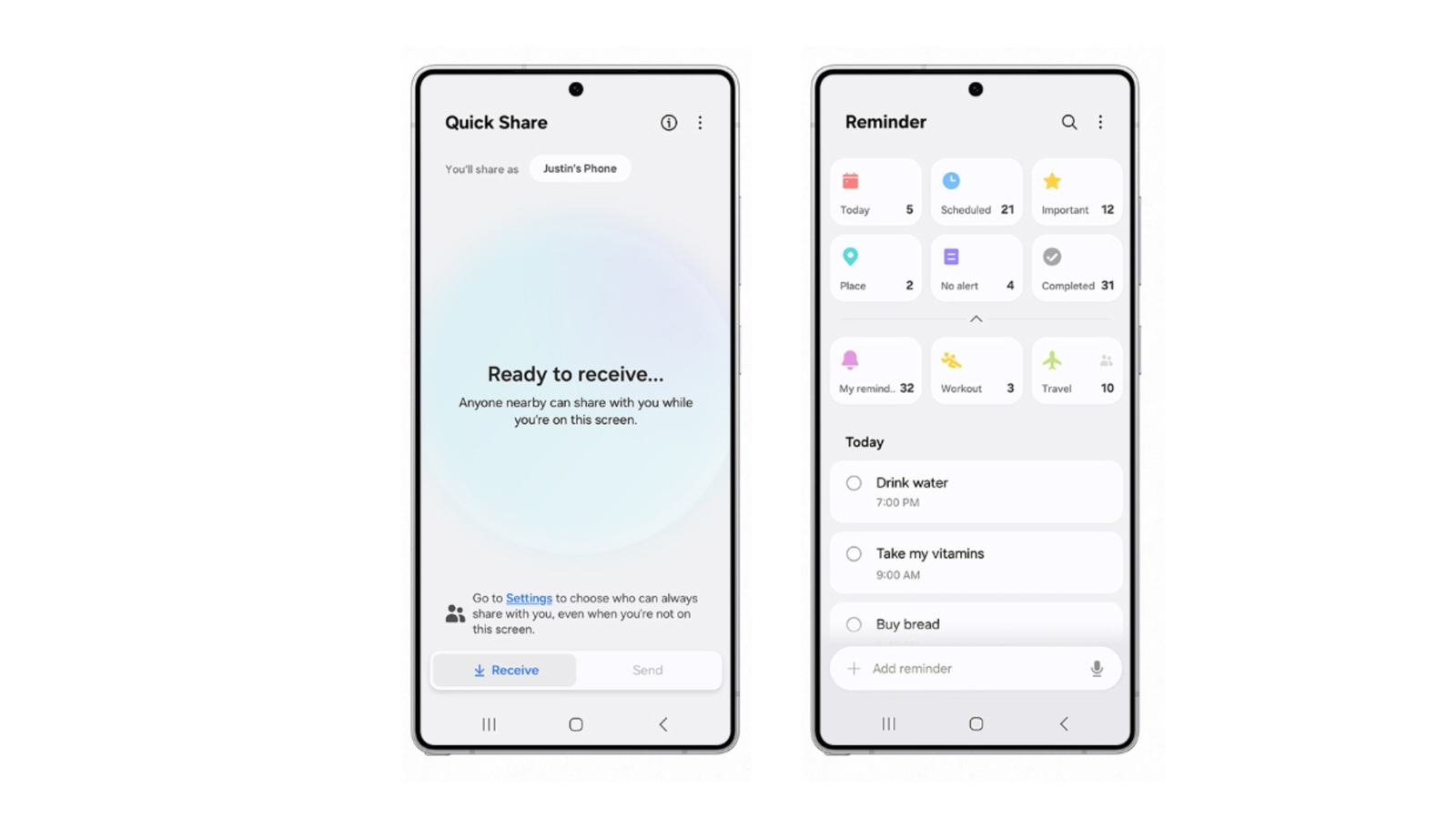
One UI 8 Feature – Image Samsung Newsroom
Recommendations: The system learns your habits and offers suggestions, like quick replies or relevant tools, right when you need them.
Samsung DeX has also been improved. Users connecting their phone to a monitor can now adjust screen resolution up to WQHD and rotate the display in various directions for better flexibility. Other apps like Calendar and Reminder have been redesigned to streamline task management, while sample reminders and quick entry options have been added to make planning easier.
The Camera app is also getting small but useful changes. A new swipe gesture makes it quicker to access controls from the viewfinder, and there’s an easier way to record and review calls directly from the Contacts app.
In the wellness department, Samsung Health will now support running challenges in addition to step tracking, and users can set up reminders to log meals to stay on track with calorie goals.
Better User Interface and Personalization
Samsung has put emphasis on a cleaner, fresher UI that feels modern and fluid:
- Redesigned Notification Panel for easier access to key controls.
- Expanded Themes and Dynamic Wallpapers: Now react to weather, time of day, and your personal style for a more unique feel.
- Advanced Widgets: New widgets like Sleep Score, Steps, and Photos offer instant useful info straight on your home screen
Enhanced Multitasking and Productivity
One UI 8 brings the best multitasking tools ever seen on a Samsung device:
- 90:10 Split Screen Option: Run two apps with a dominant main window and a slim side app—perfect for focusing without losing access to another app.
- Drag and Drop on Large Screens: Easily move content between apps on Galaxy Foldables and Tablets, making use of every inch of your display
Improved Performance and Battery Life
Thanks to optimized algorithms, One UI 8 ensures:
- Faster app launches.
- Reduced power consumption.
- Smoother transitions and animations—even on older devices
Unmatched Security and Privacy
With robust protections like Samsung Knox Vault, your personal data is secured by dedicated hardware, and on-device AI processing gives you transparency and control over privacy settings
Eligible Devices and Rollout
One UI 8 is debuting on the Galaxy S25 series and comes pre-installed on the latest foldables: Galaxy Z Fold 7 and Z Flip 7. The update is expanding to a wide range of devices, including Galaxy S24, S23, select Galaxy A, M, and Tab series models, rolling out region by region over the summer of 2025.
Galaxy S series
- Galaxy S25
- Galaxy S25+
- Galaxy S25 Ultra
- Galaxy S25 Edge
- Galaxy S24 Ultra
- Galaxy S24+
- Galaxy S24
- Galaxy S24 FE
- Galaxy S23 Ultra
- Galaxy S23+
- Galaxy S23
- Galaxy S23 FE
- Galaxy S22 Ultra
- Galaxy S22+
- Galaxy S22
- Galaxy S21 FE
Galaxy Z series
- Galaxy Z Fold Special Edition
- Galaxy Z Fold 6
- Galaxy Z Fold 5
- Galaxy Z Flip 6
- Galaxy Z Flip 5
- Galaxy Z Fold 4
- Galaxy Z Flip 4
Galaxy A series
- Galaxy A73
- Galaxy A56
- Galaxy A55
- Galaxy A54
- Galaxy A53
- Galaxy A36
- Galaxy A35
- Galaxy A34
- Galaxy A33
- Galaxy A25
- Galaxy A24
- Galaxy A15 (LTE+5G)
- Galaxy A16 (LTE+5G)
- Galaxy A06
Galaxy Tab series
- Galaxy Tab S10+
- Galaxy Tab S10 Ultra
- Galaxy Tab S10 FE
- Galaxy Tab S10 FE+
- Galaxy Tab S9 FE+
- Galaxy Tab S9 FE
- Galaxy Tab S9 Ultra (Wi-Fi/5G)
- Galaxy Tab S9+ (Wi-Fi/5G)
- Galaxy Tab S9 (Wi-Fi/5G)
- Galaxy Tab S8 Ultra (Wi-Fi/5G)
- Galaxy Tab S8+ (Wi-Fi/5G)
- Galaxy Tab S8 (Wi-Fi/5G)
- Galaxy Tab A9
- Galaxy Tab A9+
- Galaxy Tab S6 Lite (2024)
Galaxy F series
- Galaxy F55
- Galaxy F54
- Galaxy F34
- Galaxy F16
- Galaxy F15
- Galaxy F06
Galaxy M series
- Galaxy M56
- Galaxy M55s
- Galaxy M55
- Galaxy M54
- Galaxy M34
- Galaxy M53
- Galaxy M33
- Galaxy M16
- Galaxy M15
- Galaxy M06
Galaxy XCover series
- Galaxy XCover 7
- Galaxy XCover 7 Pro
- Galaxy XCover 6 Pro
Why Upgrade to One UI 8?
Future Ready: Built on the latest Android core and optimized for AI.
Boosted Productivity: Smarter multitasking and customizations.
Personalized Experience: Dynamic tools and suggestions that actually matter to you.
Top-Tier Security: Enhanced device and data protection, from the chip level up.
One UI 8 proves that Samsung is leading in terms of innovation, user experience, and intelligent customization. Whether you’re managing your busy day, personalizing your device, or just seeking smooth, secure performance, One UI 8 delivers on every front. If you own a Galaxy phone or tablet and want your device to feel truly next-gen, this is one update you won’t want to skip.




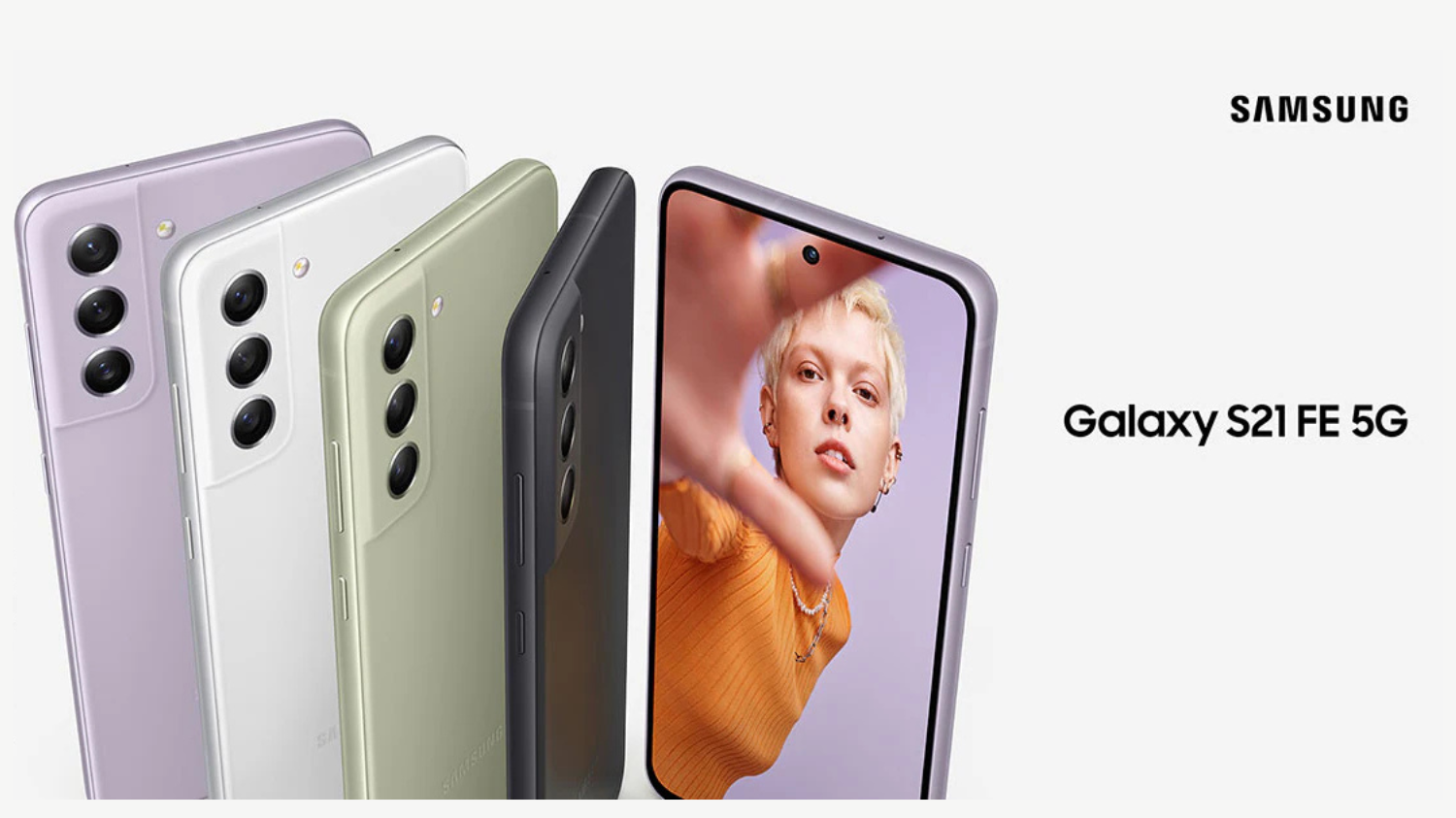
The owners of the Galaxy S21 FE USA variant are now receiving the One UI 8 update. Here in this article, we will check the latest software version and changelog.
Galaxy S21 FE gets Android 16 and One UI 8 in the USA
The carrier-locked version of the Galaxy S21 FE has started getting the Android 16-based One UI 8.0 update. It comes with firmware version G990USQUJIYJ2 or G990U2SQUHIYJ2, depending on the model number of the phone. The update is now available on AT&T, Cricket Wireless, Metro PCS, and T-Mobile networks.
The update is still not available for the factory unlocked version of the Galaxy S21 FE. If you have a carrier-locked Galaxy S21 FE in the USA, you should check for the new update right away.
You can check for the update by navigating to Settings > Software update > Download and install. After the update is downloaded, tap the Install now button to start the installation process.
One UI 8 brings several new and improved features to the Galaxy S21 FE. Some of them include a more secure version of Secure Folder, a redesigned Quick Share app, and a completely new codebase for DeX. It also brings more actions and conditions in Modes and Routines. The Weather app also has better visuals.
As per the specifications are concerned, the Galaxy S21 FE was launched in early 2022 with Android 12 (One UI 4.0) onboard. It received the Android 13 (One UI 5.0) update later that year and the Android 14 (One UI 6.0) update in late 2023. A few months ago, Samsung released the Android 15 update for the phone. Based on the company’s promise, Android 16 is the last major Android OS version the phone will run.
One UI 8.0 brings a new design to Samsung Internet, Quick Share, and Weather apps. It also brings more actions and conditions to the Modes And Routines app, more customizable Quick Panel, and more lock screen customization options.
One UI 8 redefines versatility with UX optimized across the Galaxy product portfolio. Designed to adapt to the unique form factors of Galaxy smartphones and tablets, One UI 8 ensures seamless functionality while boosting productivity and efficiency.
AI Results View displays results from AI features in a separate Split View or Floating View, keeping their original content visible and unobstructed.
Thanks to Galaxy AI Optimized for Large Screens, Multi Window lets users drag and drop AI-generated content — including images and text — directly into their workflow. Tools like Drawing Assist10 and Writing Assist11 unlock an even smoother creative process, as users can move ideas and visuals around more easily than ever before.
Gemini Live is now available directly on Flip’s FlexWindow for hands-free voice search, acting as a personal assistant right on the cover screen.
Audio Eraser proactively detects and removes unwanted background noise, like wind or traffic, with a single tap on a new toggle in video apps and audio apps.
Featuring a new clock design that stretches and adapts to match the user’s wallpaper. The clock’s font wraps around faces or contours, ensuring visibility without disrupting the image, whether it’s a close-up selfie or a picture of pets. Users can also customize the thickness, size and color of the font to meet their personal taste.
With advanced customization even for FlexWindow, users can easily create a wallpaper by receiving recommendations and auto-curated wallpapers from the Gallery.15 Emojis and background colors are also customizable for FlexWindow Emojis wallpaper.
Samsung already released One UI 8.0 for its eligible devices and so far several devices are a part of this amazing update. Now, the company has published details of November 2025 security patch for Galaxy devices a little earlier than usual.
Samsung November 2025 Security Patch Details
According to Samsung, the November 2025 security patch fixes 25 problems found in Android. Two of these are serious issues, and the other 23 are high-risk problems. One serious issue affects Android phones running Android 13 or newer, while the other only affects Android 16.
The company didn’t fix any minor security problems in this update. Samsung also fixed 9 security issues in its own Galaxy software. The update also repairs 11 security problems in Samsung’s Exynos chips, which are used in both phones and smartwatches. Most Exynos chips made between 2019 and 2024 may have had these issues.
Critical
CVE-2025-48593, CVE-2025-54957
High
CVE-2025-48581, CVE-2025-48525, CVE-2025-48583, CVE-2025-48588, CVE-2025-48589, CVE-2025-48594, CVE-2025-48596, CVE-2025-48597, CVE-2025-48592, CVE-2025-48590, CVE-2025-48603, CVE-2023-40130, CVE-2025-22432, CVE-2025-48575, CVE-2025-48595, CVE-2025-48598, CVE-2025-48599, CVE-2025-48612, CVE-2025-48600, CVE-2025-48604, CVE-2025-27074, CVE-2025-47370, CVE-2025-20730
Moderate
None
Already included in previous updates
None
Not applicable to Samsung devices
CVE-2025-48576, CVE-2025-27070
As of November 3, Samsung hasn’t started rolling out the November 2025 security update to any devices yet. However, it should begin soon. Keep in mind that only devices on Samsung’s monthly update schedule will get this patch.
To check for updates manually, head into your device’s Settings > Software update menu and tap Download and install.
One UI 8 also brings new features and a fresh look. The biggest addition is Gemini Live, an AI assistant that makes using your phone easier. You can point your camera at something and ask what it is, or share your screen to get help without closing your apps.
The update includes Wallpaper Recommendations, which picks the best photos from your Gallery to use as backgrounds. The Lock Screen now has new clock styles and fonts that automatically adjust around faces or objects in your photos. You can also control your Galaxy Buds from the Settings app without opening the Galaxy Wearable app.
To update your phone, open Settings, then go to Software Update, and tap Download and install. Make sure your phone is charged and connected to Wi-Fi before you start.
After updating, you’ll get the latest Android 16 with better performance, smarter AI features, and more ways to personalize your phone. This update also prepares your device for future updates, including One UI 8.5.
Samsung is now rolling out a new software update to the Galaxy M44, Galaxy A16 5G and Galaxy A53. The latest update brings One UI 8.0 (Android 16), which people have been waiting for a long time.
One UI 8 update build versions
- Galaxy M44: M446KKSU6EYJ3
- Galaxy A16 5G:A166USQU3CYIC (It is currently available on AT&T, Comcast, Cricket Wireless, DISH, MetroPCS, Spectrum Cellular, T-Mobile, and US Cellular networks in the country.)
- Galaxy A53:A536EXXUHGYI9
To get it, go to Settings > Software update > Download and install.
Galaxy M44 Specifications
Samsung Galaxy M44 is an upcoming mobile by Samsung. The phone is rumoured to come with a 120 Hz refresh rate 6.58-inch touchscreen display offering a resolution of 2408×1080 pixels (FHD+).Samsung Galaxy M44 come with 6GB of RAM. The Samsung Galaxy M44 is rumoured to run Android and is expected to be powered by a 5000mAh non-removable battery. The Samsung Galaxy M44 supports proprietary fast charging.
As far as the cameras are concerned, the Samsung Galaxy M44 is rumoured to pack a triple rear camera setup featuring a 50-megapixel primary camera; a 2-megapixel camera, and a 2-megapixel camera. It is rumoured to sport a single front camera setup for selfies, a 13-megapixel primary camera.
Samsung Galaxy M44 is based on Android and packs 128GB of inbuilt storage that can be expanded via microSD card (up to 1000GB). The Samsung Galaxy M44 is tipped to be a single SIMmobile. The Samsung Galaxy M44 is said to measure 167.70 x 78.00 x 9.10mm (height x width x thickness) and weighs 216.00 grams. It is said to launch in Black and White colours.
Connectivity options on the Samsung Galaxy M44 are said to include Wi-Fi 802.11 a/b/g/n/ac/ax, GPS, Bluetooth v5.20, and USB Type-C. Sensors on the phone are rumoured to include accelerometer, ambient light sensor, compass/ magnetometer, gyroscope, proximity sensor, and fingerprint sensor.
One UI 8 Features
Samsung in the latest One UI 8 version added a new Quick Share UI design with separate Send and Receive tabs, improved graphics in the Weather app, and an improved menu bar design for the Samsung Internet app. One UI 8 also brings better bulk management features to Calendar, Clock, and Reminder apps.
Secure Folder has received improved security, while Modes and Routines now has more actions and conditions. Samsung Health gets newer features like Antioxidant Index, Bedtime Guidance, Running Coach, and Vascular Load. Click here to read the complete changelog of the update.

Samsung outed Galaxy S26 series designs

Samsung Galaxy Tab A11+ Launched in India

Samsung Galaxy S23 FE November 2025 security patch update rolling out

8+ Samsung Keyboard Tips for enhanced Typing Experience

History Of Samsung One UI

Samsung One UI 8 October 2025 Rollout Plan
-
 Tutorials11 months ago
8+ Samsung Keyboard Tips for enhanced Typing Experience
-
 One UI9 months ago
History Of Samsung One UI
-
 News9 months ago
Samsung One UI 8 October 2025 Rollout Plan
-

 News10 months ago
Samsung One UI 8 Beta: Countries List
-
 Tutorials11 months ago
Having a Samsung Account Is Optional, But Recommended, check why?
-
 News9 months ago
Samsung Galaxy S25 and S24 – October 2025 Update
-
 News10 months ago
Explore Music Wall Feature on Samsung Smart TV
-
 News7 months ago
Samsung Galaxy S23 FE November 2025 security patch update rolling out